How to Audit a Google Ads Account: Business Checklist
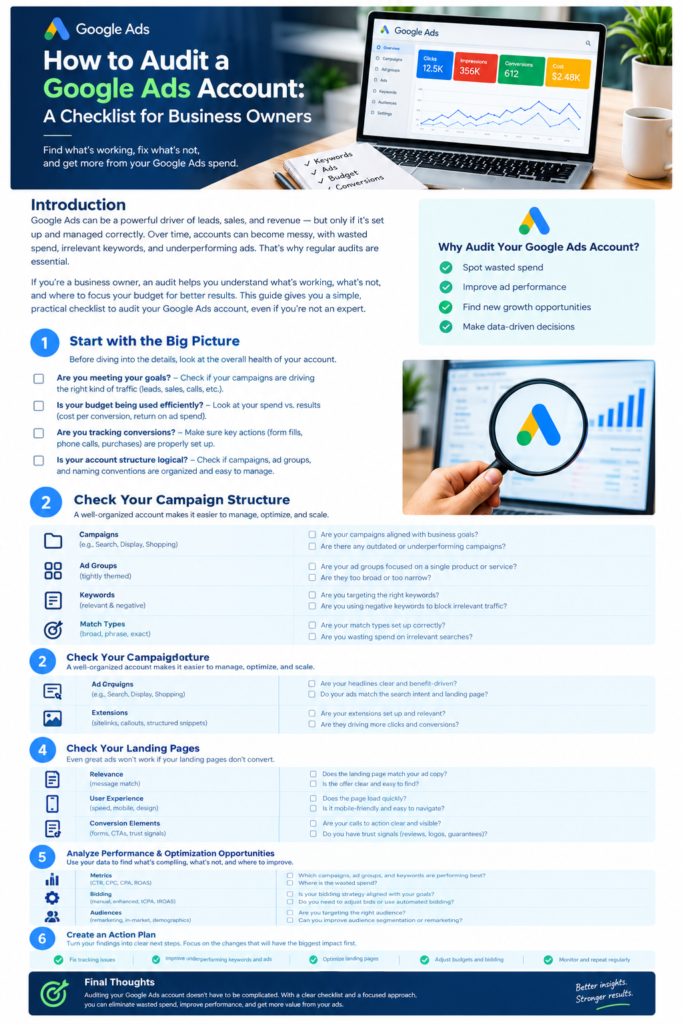
Introduction
Google Ads can be a powerful way to generate leads, sales, phone calls and new customers. However, running campaigns does not automatically mean your advertising budget is being spent effectively.
Over time, an account can develop problems. Keywords may attract irrelevant searches, conversion tracking may stop working correctly, budgets may be allocated to the wrong campaigns, and ads may send potential customers to landing pages that do not convert.
These problems are not always obvious when you look at clicks and impressions alone.
A Google Ads audit helps you understand what is working, what is wasting money, and which improvements deserve attention first.
The good news is that business owners do not need to understand every technical detail of Google Ads to ask the right questions. By following a structured checklist, you can gain a clearer picture of your account’s performance and make better decisions about your advertising investment.
In this guide, we will cover the most important areas to review, the metrics that matter, common warning signs, and how to turn your findings into a practical action plan.
Why Is a Google Ads Audit Important?
A Google Ads audit is a detailed review of your advertising account, including campaign settings, keywords, ads, conversion tracking, budgets, bidding strategies and landing pages.
The purpose is not simply to find mistakes. It is to make sure your advertising supports your business goals.
A well-conducted audit can help you:
- Identify wasted advertising spend.
- Find irrelevant search terms that attract the wrong audience.
- Improve conversion tracking and reporting accuracy.
- Understand which campaigns generate valuable leads or sales.
- Discover opportunities to improve ads and landing pages.
- Make better decisions about budgets and bidding.
- Identify areas where additional investment may be justified.
For example, a business might receive hundreds of clicks every month but very few qualified enquiries. An audit could reveal that the ads are targeting searches with little buying intent, or that the contact form is not working properly.
Fixing the underlying issue may be more valuable than simply increasing the advertising budget.
1. Start by Reviewing Your Business Goals
Before opening individual campaigns and reviewing settings, establish what the business wants Google Ads to achieve.
Different businesses need different outcomes. An online store may focus on profitable purchases, while a local service company may prioritize qualified phone calls and quote requests. A B2B company might need to generate sales opportunities that convert over several months.
Your audit should begin with these questions:
- What is the primary goal of the advertising?
- Are you trying to generate sales, leads, bookings, calls or website visits?
- What makes a lead valuable to your business?
- What is an acceptable cost per lead or customer?
- Which products, services or locations deserve priority?
- How long does it normally take for a lead to become a customer?
You should also consider your profit margins, average order value and lead-to-sale conversion rate.
For example, a cost per lead of $40 might be profitable for a high-value service business but too expensive for a business selling low-priced products. The right target depends on the economics of the business.
What to look for: Every campaign should have a clear purpose, and its performance should be judged against that purpose.
2. Check Your Google Ads Account Structure
A well-organized account makes it easier to understand performance, control budgets and identify problems.
Start by reviewing how campaigns and ad groups are organized.
Campaign structure
Check whether campaigns are separated logically according to factors such as:
- Products or services.
- Geographic locations.
- Different business objectives.
- Brand and non-brand searches.
- Budget requirements.
- Different customer types or search intent.
For example, a plumbing company might separate emergency plumbing, boiler repairs and planned installations into distinct campaigns when their goals, budgets or conversion economics differ.
This can provide better visibility into which services are generating enquiries and where budget adjustments may be appropriate.
Ad groups and keywords
Within each campaign, check whether ad groups contain closely related keywords and ads.
If an ad group contains keywords for several unrelated services, it may be difficult to write relevant ad copy or send users to the most appropriate landing page.
Account access and organization
Also review:
- Whether the correct people have account access.
- Whether former employees or agencies still have unnecessary access.
- Whether campaign names are clear and consistent.
- Whether outdated campaigns are still needed.
- Whether duplicate campaigns or overlapping targeting are creating unnecessary complexity.
Avoid changing an established account structure simply to make it look cleaner. Understand the existing setup and its performance first.
3. Audit Conversion Tracking
Conversion tracking is one of the most important parts of a Google Ads audit.
If your tracking is inaccurate, even a detailed performance report can lead to the wrong conclusions. Google Ads may appear to generate conversions that are duplicated, low-value or unrelated to actual business results.
What should you check?
- Are contact form submissions being recorded correctly?
- Are phone calls tracked where relevant?
- Are purchases and their values recorded accurately for ecommerce?
- Are important actions counted only as intended?
- Are primary and secondary conversion actions configured appropriately?
- Do conversion counts reasonably match your CRM, sales system or order records?
- Have recent website changes affected tags, forms or confirmation pages?
For example, suppose your Google Ads account reports 50 leads in a month, but your business has received only 25 genuine enquiries. This discrepancy could indicate duplicate tracking, low-quality actions being counted as leads, or a difference in how the two systems define a conversion.
The discrepancy should be investigated before making budget decisions.
Primary versus secondary conversions
Primary conversion actions are generally used for bidding and the main Conversions reporting column. Secondary actions can help you observe additional interactions without treating every interaction as a main business result.
A newsletter signup, for example, may be useful to measure but should not necessarily carry the same importance as a completed purchase or qualified sales enquiry.
Important: If conversion tracking is broken or unreliable, fix it before relying on cost per conversion, conversion rate or return on ad spend.
4. Review Campaign Performance and Key Metrics
Once you have confidence in the measurement setup, review how the account is performing.
Start with a meaningful date range, such as the last 30 to 90 days, depending on conversion volume and sales cycles. Compare results with an appropriate previous period, taking seasonality and recent changes into account.
The main metrics to review include:
| Metric | What it tells you |
|---|---|
| Impressions | How often your ads were shown |
| Clicks | How many people clicked your ads |
| Click-through rate (CTR) | How often impressions resulted in clicks |
| Cost per click (CPC) | How much you paid per click on average |
| Conversions | How many tracked conversion actions occurred |
| Conversion rate | The proportion of measured interactions that resulted in conversions, according to the platform’s reporting definition |
| Cost per conversion | The average advertising cost per reported conversion |
| Return on ad spend (ROAS) | Tracked conversion value relative to advertising spend |
These metrics provide useful information, but none should be viewed in isolation.
A high click-through rate does not guarantee sales. A low cost per click does not guarantee profitable leads. Even a low cost per conversion can be misleading if the conversions are not valuable to the business.
For lead generation, review the quality of enquiries, the proportion that become customers and the revenue they generate. For ecommerce, compare tracked revenue and advertising costs while considering margins, fulfilment costs and other expenses.
Segment the data
Do not rely only on account-wide averages.
Break down results by campaign, product, service, device, location and other relevant dimensions. This can reveal that one campaign is wasting money while another consistently generates valuable customers.
The objective is to identify where the business is getting meaningful results—not simply where it is generating the most activity.
5. Review Keywords and Search Terms
Keywords influence which searches can trigger your ads, but the Search terms report helps you understand what people actually searched for.
This is particularly important when a campaign receives clicks without producing relevant enquiries or sales.
Check keyword relevance
Ask yourself:
- Do the keywords match the products or services you offer?
- Are they attracting people who are likely to become customers?
- Are there keywords with significant spend but no meaningful results?
- Are important, high-intent search themes missing?
- Do the ads and landing pages match the intent behind those searches?
A business selling premium office furniture, for example, may discover that some of its advertising spend is going toward searches for free furniture, furniture repair instructions or unrelated second-hand products.
Depending on the business and its offering, these searches may have little commercial value.
Review negative keywords
Negative keywords help prevent ads from showing for unwanted searches.
However, they should be added carefully. A term that appears irrelevant in one context may be valuable in another.
Review the actual search query and consider its intent before excluding it.
Understand match types
Google Ads offers broad, phrase and exact keyword match options. Each can help reach potential customers in different ways.
Your audit should examine whether the current match-type strategy is suitable for the campaign’s objectives, available conversion data and ability to control irrelevant traffic.
Broad match can help discover additional relevant searches, but it requires appropriate measurement and ongoing monitoring. Phrase and exact match can provide more focused targeting, although they do not guarantee that every search will match a keyword in the way a business owner might expect.
Practical tip: Review the Search terms report regularly. It can reveal wasted spend, new keyword opportunities and changes in how potential customers search.
6. Evaluate Your Ads and Ad Assets
Your ads should make it clear what you offer, why a potential customer should consider your business and what they should do next.
Review the ad copy and make sure it reflects the user’s search intent.
Check your ad messaging
- Are the headlines clear and relevant?
- Do the descriptions explain the key benefits?
- Is your unique selling proposition easy to understand?
- Does the ad accurately represent the offer on the landing page?
- Are prices, promotions, phone numbers and claims up to date?
- Is there a clear call to action?
- Are the destination URLs correct?
Review ad assets
Where appropriate, check whether relevant assets are configured, such as:
- Sitelinks.
- Callouts.
- Structured snippets.
- Call assets.
- Image assets.
The available options depend on campaign type, eligibility and current Google Ads features.
Do not assume that more assets automatically produce better performance. The important question is whether they help potential customers understand the offer and take the next step.
Test improvements carefully
Rather than changing everything at once, test meaningful differences in messaging.
For example, you could compare messaging that emphasizes speed, price, specialist expertise or a particular customer benefit.
Evaluate the results using appropriate conversion data and business outcomes. Platform indicators such as ad strength can be useful diagnostics, but they are not guarantees of profitability.
7. Check Your Landing Pages
Your advertising campaign does not end when somebody clicks an ad. The landing page must help that person take the intended action.
A relevant ad can still waste money if the destination page is confusing, slow or difficult to use.
Landing page audit checklist
Relevance
- Does the page match the keyword and ad message?
- Can visitors immediately understand the product or service?
- Is the advertised offer easy to find?
User experience
- Does the page load quickly?
- Does it work properly on mobile devices?
- Is the navigation straightforward?
- Are there broken links, errors or distracting elements?
Conversion elements
- Is the call to action clear?
- Do forms work correctly?
- Are phone numbers easy to find?
- Is the booking or checkout process straightforward?
- Are trust signals, reviews or credentials available where relevant?
Measurement
- Does the intended action trigger the correct conversion?
- Is the confirmation page or completed transaction recorded appropriately?
- Can the business connect enquiries with their eventual outcomes?
Why landing pages matter
Imagine that your ads generate 200 relevant clicks, but visitors struggle to find the contact form. Improving the page layout and making the next step clearer may help you get more value from the same traffic.
However, do not assume that a high conversion rate always means a better landing page. Review the quality of the leads or sales as well.
8. Review Budgets and Bidding Strategies
Budget decisions should reflect business priorities, conversion performance and the ability to handle additional demand.
Review how much each campaign spends and compare it with the outcomes it produces.
Ask these questions:
- Are high-priority campaigns receiving sufficient budget?
- Are low-performing campaigns consuming too much spend?
- Is the selected bidding strategy appropriate for the objective?
- Are automated bidding targets realistic?
- Is conversion tracking reliable enough to support automated bidding?
- Have recent budget or bidding changes affected results?
- Can the business handle more leads or orders if spend increases?
Google Ads supports different bidding approaches, including strategies focused on clicks, conversions and conversion value. The most suitable option depends on the campaign goal, available data and business economics.
Automated bidding can be effective, but it depends on the signals provided to the system. If the account measures duplicate or low-quality conversions, automated bidding may optimize toward actions that do not benefit the business.
Avoid making large, frequent changes without a clear reason. Make controlled adjustments and allow enough time to assess the results, accounting for conversion delays.
9. Check Locations, Devices and Ad Schedules
Targeting settings should reflect where your customers are and when they are most likely to take valuable action.
For a local service business, advertising outside its service area can waste budget. For a business that relies on phone enquiries, running ads when nobody can answer calls may also create missed opportunities.
Review the following:
- Are the targeted locations correct?
- Are ads attracting people from areas the business cannot serve?
- Do device performance differences indicate a genuine opportunity for improvement?
- Are ads running at appropriate times?
- Are call-handling and lead-response processes aligned with the advertising schedule?
- Are audience settings being used correctly?
- Is there enough data to justify any exclusions or bid adjustments?
Consider conversion quality and sample size before making changes. A segment with fewer conversions may still contribute to valuable customers, particularly when buying decisions take time.
10. Assess Lead Quality and Actual Business Results
One of the biggest mistakes in Google Ads management is treating every tracked conversion as equally valuable.
A form submission is not necessarily a qualified lead. A phone call is not necessarily a sale. A recorded ecommerce conversion may not reflect the full profitability of an order.
Where possible, connect advertising data with your CRM, call tracking, sales system or ecommerce platform.
Review questions such as:
- How many leads were genuinely relevant?
- How many could the sales team contact successfully?
- How many became customers?
- Which campaigns generated the most valuable customers?
- What revenue or profit can be attributed to those customers?
- Are low-quality leads consuming a significant portion of the budget?
For businesses with long sales cycles, immediate conversion data may not tell the complete story. You may need to review qualified leads, opportunities and closed sales over a longer period.
This information can change your decisions about which campaigns deserve more investment.
For example, Campaign A might generate 30 leads at a lower cost, while Campaign B generates only 15 leads at a higher cost. If Campaign B produces substantially more paying customers, it may be the stronger campaign for the business.
The goal is to improve commercial results, not simply maximize conversion volume.
11. Create an Action Plan After the Audit
An audit becomes valuable when the findings lead to clear, measurable improvements.
Do not attempt to change every campaign, keyword, bid and landing page at the same time. Prioritize the issues that are most likely to affect business results.
A practical approach is to group findings into three levels.
Priority 1: Critical issues
Address problems that make performance data unreliable or create significant avoidable risk.
Examples include:
- Broken or duplicated conversion tracking.
- Incorrect landing page URLs.
- Ads targeting locations the business cannot serve.
- Significant spend on clearly irrelevant traffic.
- Incorrect pricing or outdated promotional messaging.
Priority 2: High-impact improvements
Focus on opportunities that may improve lead quality, conversion performance or budget allocation.
Examples include:
- Adding carefully selected negative keywords.
- Improving weak landing pages.
- Correcting poorly aligned campaign budgets.
- Improving ad relevance.
- Investigating campaigns with significant spend but weak business outcomes.
Priority 3: Ongoing optimization
Once the fundamentals are working properly, focus on measured improvements.
Examples include:
- Testing new ad messaging.
- Exploring relevant keyword opportunities.
- Improving reporting.
- Testing landing page changes.
- Evaluating new campaign opportunities.
- Refining bidding strategies based on reliable data.
For each action, record the problem, recommended change, responsible person, expected outcome and metric used to measure success.
After implementing changes, monitor performance over an appropriate period and document what you learn.
12. Google Ads Audit Checklist for Business Owners
Use the following checklist during your next account review.
Your audit progress
0 of 15 completedBusiness goals and target cost per result are clearly defined.Account access and permissions are appropriate.Campaign structure and naming conventions are logical.Locations, languages, schedules and campaign settings are correct.Conversion tracking has been tested and validated.Primary and secondary conversion actions are configured appropriately.Campaign performance is assessed against business outcomes.Search terms and negative keywords have been reviewed.Keyword targeting matches the services or products offered.Ad copy, assets and destination URLs are accurate.Landing pages work properly on mobile and desktop.Budgets and bidding strategies reflect business priorities.Lead quality or purchase value is reviewed where possible.Important findings are prioritized and assigned.Results are monitored after changes are implemented.
Copy checklistReset
13. How Often Should You Audit a Google Ads Account?
The right audit frequency depends on account size, complexity, spend and how quickly the business changes.
For many small and medium-sized businesses, a useful starting point is:
- Weekly: Review major performance changes, spend, lead flow and tracking alerts.
- Monthly: Check search terms, campaign results, budgets, lead quality and obvious optimization opportunities.
- Quarterly: Conduct a more comprehensive review of account structure, conversion tracking, bidding strategy, landing pages and business outcomes.
- After major changes: Review the account following a website redesign, tracking update, campaign restructure, major budget change or unexpected performance decline.
New accounts and high-spend campaigns may require closer monitoring. Businesses with strong seasonal demand may also need additional reviews before important periods.
The aim is to identify issues early without making unnecessary changes based on short-term fluctuations.
Conclusion
A Google Ads audit does not have to be complicated. By reviewing the right areas in a structured way, business owners can gain a clearer understanding of where their advertising budget is going and whether it is generating meaningful results.
Start with your business goals and conversion tracking. Then review campaign performance, keywords, ads, landing pages, budgets and lead quality. Finally, turn your findings into a prioritized action plan and measure the impact of the changes.
Remember that more clicks do not necessarily mean more business. The real objective is to attract the right audience, generate valuable enquiries or sales, and make the advertising investment worthwhile.
A regular audit helps you spot problems, uncover opportunities and make better decisions as your business grows.
Need help auditing your Google Ads account?
If your campaigns are spending money without delivering the results you expect, a professional review can help identify tracking issues, wasted spend and opportunities for improvement.
Review your campaigns, understand the numbers and build a clearer path toward better advertising performance.
Disclaimer
This article is for general educational purposes only and does not guarantee specific advertising results. Google Ads features, policies and interface labels may change. Recommendations should be adapted to your account, business objectives, data quality and budget.